Selfie to Avatar
Transfer your recorded expressions
and movements to an avatar
Transfer expressions and head movements from a selfie video to your chosen avatar. Change the voice, too, while preserving your own performance and delivery.
Selfie to Avatar in action
Your selfie video,
with a new appearance and voice
Compare the original and transformed videos
and follow the actual steps from import to generation.
Your recorded movements
become the avatar’s movements
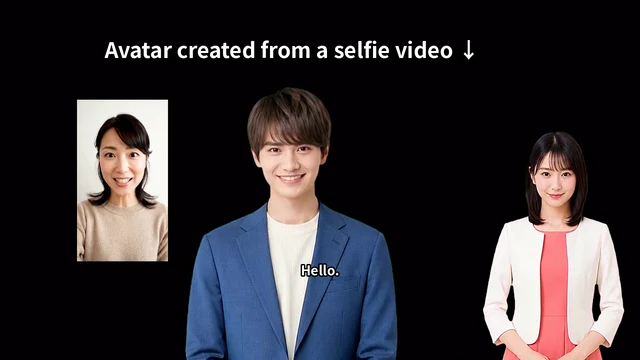
From a woman’s selfie video to a male avatar. Preserve expressions, head motion and speech timing, and choose a different voice.
- Compare the selfie and transformed avatar
- See video import and avatar and voice selection
- Review the generated video in the editor
Record yourself speaking
to animate your avatar
Nods, head direction and changing expressions.
Bring in performances that text alone cannot express
from a selfie video.
Record with a camera
Record using Selfie in the editor. Face the camera and speak with your face clearly visible.
Use a video you have already recorded
Import footage from a smartphone or another device. MP4, WebM and MOV are supported.
Transfer motion to the avatar
Your chosen avatar mimics the video’s expressions and head movements. Perform the delivery you want for each scene.
Keep your delivery.
Change your voice.
Use Voice Wrap to convert imported audio into another voice.
Preview voices to find the right fit for your video and avatar.
Combine an appearance and a voice
Change the sound of your voice while retaining your pauses and intonation. Find the right voice for friendly guidance, calm training or a character-led explanation.
Filter by name or gender and preview before choosing. The original voice is retained, so you can switch back later.
From recording to video editing
Prepare a selfie video
Record with your camera or choose and import an existing video.
Choose voice and motion
Review the voice, expressions and head motion, and choose what to transfer to the avatar.
Place it on the timeline
Add the imported content to the avatar track, then combine it with slides, backgrounds and subtitles.
Generate and finish your video
Check the preview, edit clip positions, lengths and the layout, then export.
About Selfie to Avatar
Does my own face have to appear in the finished video?
No. Expressions and head movements are transferred to your chosen avatar, so your own face does not need to appear in the finished avatar video.
Can I import audio only?
Yes. Audio-only import uses the voice without importing recorded expressions or head movements.
How is this different from creating an avatar from a photo?
Selfie to Avatar transfers a video performance to an avatar. Photo-based avatar creation creates the person who will appear in the video from a single image.
Contact us / Free demo
Explore real screens and examples tailored to your use case.
Contact us / Free demo